Keeping up: theme changes

Astute readers (and I know who you two are!) will notice a change to a newer theme. I’ve switched over to the WordPress Twenty-Eleven base theme, with a few of my own tucks, nips and tweaks. I wanted to check out the new theme and test out the new functionality and keep up with the latest stuff.

Child themes are a piece of cake to create, and a child theme lets me override the original without messing with the original source, so updates will not erase the changes. While they are not so difficult to do manually if you are familiar with the command-line, they are even easier with the plugin One-Click Child Theme.

With the child theme in place, I was able to shorten the gap between the site description (the motto) and the header picture, just by adding CSS to the style.css in the child theme (that’s the cascading part of CSS). I added a paper-curl edge effect based on the work of Craig Buckler, published on Sitepoint.

I was disappointed that my site was not valid HTML5, according to the W3C’s validator site. Category tags used in REL links aren’t standard, so I deleted those. The Creative Commons plugins want to use Dublin Core XML namespaces, and there are issues there I’ve got to clean up. And the “generator” REL tag on the bottom of the page isn’t too standard, either. Overall, though, the pages are relatively clean of excessive markup or poorly-formed structures. Stay tuned as I tweak the last few elements into line.

Seacoast WordPress Developers Group, April Notes

On April 6th, the Seacoast WordPress Developer’s Group met at the New Hampshire Innovation Commercialization Center to talk WordPress. Networking and casual conversation started around 6:30, with the meeting formally starting at 7 PM with a round of introductions:

Dave – former Cold Fusion, ETL, new to WordPress,
Carl Eric Johnson – web developer, WordPress instructor and eveloper, fan of Thesis framework.
Amanda – BIL doing Joomla, Drupal, and WordPress
Sharon, Rye Public Library, Technology Coordinator, just launched a freshened site on April 1st using WordPress and Atahualpa theme/framework.
Will, a graphic designer in a print shop who’d been encouraged to learn web design and now WordPress.

Book recommendations:
Amanda praised the Wrox Professional WordPress book.
Eric has enjoyed WordPress: Visual QuickStart Guide to get up and running, and WordPress Bible(Aaron Barzell) from Wiley as a reference.

Main Presentation: Carl Eric Johnson: talk about themes and frameworks
Sitepoint.com Wicked WordPress Themes book has free sample download chapter. Table of contents points out the choices of custom themes, child themes, building a framework.
Child themes: load with parent’s theme files, in your child file, you import the parent, then override what’s different.
In WordPress 3.0, theme TwentyTen has a lot of options built in. Thesis and Atahualpa have a number of pages of options: sizing, features, colors, styles, etc.

Amanda talked about file structures and “the loop” – directories of wp-admin and wp-install are pretty much off-limits, containing the installed WordPress files and overwritten up updates; wp-content contains most everything else, including the stuff you customize. Add your own functions.php and copy the functions you want to override. A theme consists of index.php and style.css as a minimum; you can add as much as you want from there. See the Codex for the hierarchy of theme files WordPress looks for in order to render your content. Consider starting with a “blank” theme if you’re building your own, such as Starkers or Boilerplate themes – essentially stripped-down skeletal themes with all of the style removed.

See http://codex.wordpress.org/Template_Hierarchy for a description of how WordPress selects the correct template(s).

See http://codex.wordpress.org/The_Loop_in_Action for an overview of the loop.

Seacoast WordPress Developers meeting, 2-March-2011

Five people attended the March meeting of the Seacoast WordPress Developer‘s meetup, held at the New Hampshire innovation Commercialization Center near Pease in Portsmouth. We did a round of introductions and welcomed two new members and discussed what the group could focus on. We discussed the boundaries of CMS and Blogging and Wikis and how they overlap (A professional in education provided us with some great insights on how we think about some of these items), the challenge in finding consultants and clients, and how we can build up a network. We talked about potential agenda items: what should we schedule, what should we have in free-form.
I think an FAQ we ought to be prepared to answer is “What is it that WordPress is?” It’s less than obvious. “A blog” is the wrong answer, as that is a form of document, and not an application. “A CMS” is such a vaguely defined answer that it’s not much more useful than “an application.”

Other questions we started to explore, and possible future topics:

  • What is it that others are looking for on the web?
  • Good resources for learning WordPress: Codex, FAQ, books, etc.
  • WordPress SEO
  • WordPress Security
  • Loop/structure of databases tables, templates
  • Popular plugins
  • WordPress Backup tips: data and files
  • WordPress Community

Finally, Amanda presented her talk on building a plugin. She’d done some excellent research and used clear examples and explained them well. Here are the notes and slides posted to the new Seacoast WordPress Developer’s website, running WordPress, of course, and BuddyPress.

So, it was a great second meeting of the Seacoast WordPress Developer’s group. Stay tuned for more news. Thanks to Amanda for organizing the event, and to the New Hampshire Innovation Commercialization Center for providing the great facilities!

Seacoast WordPress Developers Group announce March meeting

Organizer Amanda Giles announced a second meeting of the Seacoast WordPress Developers Group:

When: Wednesday, March 2, 2011 7:00 PM
Where: NH-Innovation Commercialization Center, 75 Rochester Avenue, Portsmouth, NH 03801
Why: Let’s get together for another meetup. More details coming soon. Please send me your suggestions or ideas for things you would like to share or see shared.

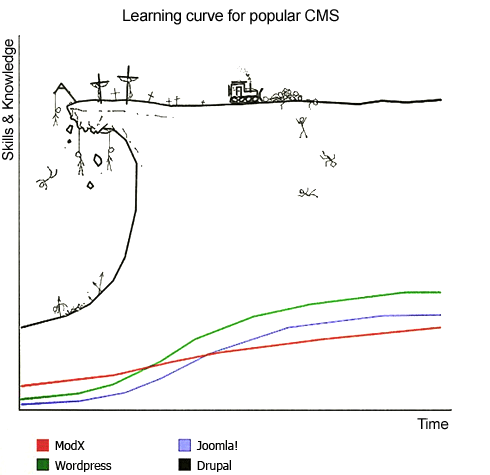
CMS Learning Curves, artist unknown

CMS Learning Curves

Notes from CentraLUG, 6-Dec-2010: David Berube, MySQL Operations

Six people attended the December 2010 meeting of the Central New Hampshire Linux Group, held at the New Hampshire Technical Institute‘s Library from 7 to 9 PM. David Berube was the featured speaker, talking about his experience with large scale high-performance MySQL applications.

David is an independent software developer and consultant. One of his larger projects over the past couple of years has been an application for scheduling actors for auditions. This involves agents and projects, auditions, roles, videos and a number of other entities in a complex and fast-moving application. He’s used Ruby on Rails, PHP, MySQL, a NOSQL database, Amazon S3, A rack of Mac Minis, BSD, Linux, and a number of other elements. He had some insightful things to say about the development process, managing a client project, handling difficult requirements, scaling up million-row databases for subsecond response times and more. It was a meeting well worth attending.

There were a lot of useful tools and reference sites mentioned, and I was only able to take note of a few: Useful Ruby add-ons: New Relic, Query Reviewer, Percona Operations Day, Cacti for data aggregation. An In-depth discussion of NoSQL (“Not Only SQL”) Databases: what are they, what are they good for, what are the liabilities? A good discussion of the trade-offs of using NoSQL, reference to the NHRuby presentation on Redis a few months ago, and more.

Thanks to David for an informative presentation, to the attendees for a dynamic interactive session, and to the NHTI Library for the facilities. Future meetings at the Concord location have been suspended, we encourage our regulars to attend the Manchester ManchLUG meetings. If you haven’t already, consider subscribing to the announcement list so you’ll know when there’s an upcoming meeting. (Subscribers to the discussion list will automatically receive the announcements, too.)

CentraLUG, 6-Dec-2010, David Berube, MySQL Operations

The December meeting of the Central NH Linux User Group will be held as usual in Room 146 of the NHTI Library – details and directions can be found at http://www.centralug.org – and will feature David Berube presenting “Real World Experience with Large MySQL Deployments”

David recently attend the Percona Operations Day training covering real world howto’s on big MySQL deployments and will share what he’s learned.

About David: David is a principal at Berube Consulting. David Berube is a software developer, consultant, speaker, and writer. He is constantly researching, perfecting, and practicing his trade. He is a prolific writer, appearing in places such as Dr Dobbs Journal, Linux Magazine, IBM DeveloperWorks, PHP International Magazine, and many others. He speaks frequently, notably including his seminar series, “Making Money Using Open Source Software”. He authored the books “Practical Rails Gems” and “Practical Reporting with Ruby and Rails”, and co-authored the book “Practical Rails Plugins.” He is also a leader in the Open Source community. He was involved with the AmphetaDesk project, developing much of its Win32 GUI code.

Notes from CentraLUG, 4-Oct-2010: Patent Absurdity

Five people attended the October meeting of the Central NH Linux User Group, an affiliated chapter of the Greater New Hampshire Linux User Group. We met at the NHTI Library, Room 146.

We had an attendee with a tech support question we weren’t able to answer on the spot, but gave him some resources to pursue. He was plugging his camera into his Ubuntu machine, and he wanted to set the mount point to be a fixed mount point rather that something dynamically created by dbus. He made some changes, but wasn’t sure of exactly what he had changed, and the device no longer appears when he plugs it in. It does appear on other machines, Linux Mint and Windows, so the device is unlikely to be broken. No one present was sure where the settings might be stored for this. We suggested joining the gnhlug-discuss list as well as the support forums provided by Ubuntu Linux. I look forward to some of our experts helping our friend out.

I let folks know that I’ve reserved the room for November and December. After that, we’ll likely start meeting with the ManchLUG group, unless someone else wants to keep running meetings in Concord. We reviewed the GNHLUG wiki for upcoming meetings. Especially noted were the upcoming DLSLUG meeting “About Lisp -or- Lambda, the Ultimate Lecture, presented by Yoni Rabkin” and the New Hampshire High Tech Council‘s TechWorld 2010 conference ($25 – $210) coming up next Thursday and Friday. We discussed the idea that a nicer-looking forum software, like Drupal, would be nice to implement on the GNHLUG site, and talked about the past efforts to do that, and some of the challenged past projects have run into.

We mentioned that there’s a effort to create a community-driven site to support and distribute a new fork to OpenOffice.org named LibreOffice. Some of the other projects involved in the MySQL – Sun – Oracle mergers have been making interesting news as well.

Thanks to Dave Rose for providing the projector. We used a Live USB version of Fedora 14 beta which shipped last week and saw a pretty remarkable “It Just Works” effect: plugging in the running ThinkPad (a T61, 1680×1050, with an nVidia controller), the open source nouveau driver recognized the Sharp projector and automatically reconfigured the display (1400×1050) for side-by-side (“twinview”) layout with the internal screen. No xrandr, no rebooting of the machine! Wow. We brought up the Gnome display properties dialog and moved them around and finally settled on a mirrored display for the main presentation. This is a huge time saver and convenience for doing presentations!

Our main presentation was a viewing of the documentary, “Patent Absurdity, How software patents broke the system” and a discussion afterwards on what you can do (contact your Congress-person, contribute to organizations, etc.). Everyone learned something from the show, and perhaps from the discussion afterwards.

Thanks to all for attending to Dave for providing the projector, and to NHTI for providing the facilities!

HowTo notes: installing REE, Passenger, Ruby on Rails on CentOS5

Recently, I installed Redmine, the Rails-based project tracker,  on an existing virtual private server, running CentOS 5 Linux and an assortment of LAMP applications and web sites using Apache, PHP and MySQL. I chose Ruby Enterprise Edition (REE), an optimized and high-performance version of Ruby, and Passenger, an Apache module to connect to Ruby. Here are the steps I followed, as a reference and in hopes it might help others:

  1. Log onto the box via ssh. As a good practice, I run as an unprivileged user, and use sudo only when superuser rights are needed. So, download the files and un-tar them and read the READMEs and run the processes as a regular user, switching to root via sudo only when the rights are needed.
  2. Download and install Ruby Enterprise Edition. Today, that’s:
    wget http://rubyforge.org/frs/download.php/68719/ruby-enterprise-1.8.7-2010.01.tar.gz

    but follow the instructions you’ll find at http://www.rubyenterpriseedition.com/download.html for the latest. Those instructions will have you un-tar the file and then run the installer.

  3. Install the tools needed to build Ruby Enterprise Edition. If you run the installer, it will prompt you for missing tools. In my case, I needed to:
    sudo yum install gcc-c++ make patch zlib-devel openssl-devel readline-devel
  4. If you’ll be using mysql, you’ll need the native code to build the matching gem. REE attempts to build gems for MySQL, SQLite and PostgreSQL, so choose your flavor and issue the appropriate command like:
    sudo yum install mysql-devel
    

    or postgresql-devel or sqlite-devel as appropriate.

  5. Follow the instructions supplied by the REE installer. They did a nice job on that. To install Passenger when I was done, some additional source code files were required:
    sudo yum install httpd-devel apr-devel
    sudo /opt/ruby-enterprise-1.8.7-2010.01/bin/passenger-install-apache2-module
  6. Once again, follow the prompts to add the proper load module and path commands to your web server configuration, add a configuration file for your site, and you’re ready to start installing your site’s code.

NOTE: It wasn’t the case with my particular host, but you may need to adjust your SELinux settings, if you’ve got SELinux enabled. See the post at http://www.catapult-creative.com/2009/02/04/installing-rails-on-centos-5/ and look for “SELinux” for some ideas.

Visibone, a source of great reference guides and online utilities

Visibone's Everything Book
One of my favorite tools for the past couple of years has been a web developer’s reference guide from Visibone. The book has rarely left my desk, within arm’s reach, to help out when I just can’t remember all the options for an HTML tag or a CSS style. While there are some great online references, having it all in a couple sheets of paper makes it easy to find what I’m looking for (especially if I couldn’t remember if it was text-something or font-mumble) and the reference has also let me browse around the dusty corners and learn something I didn’t know.

Recently, I did some web development using XHTML 1.1 and CSS 2.1 and realized my 2004 version of the guide was getting out of date. I was pleased to see many of the pages had been updated to a 2009 version. After reviewing the many options, I chose to go all in and bought the Everything Book, a step up from my earlier version. This one includes cheatsheets for PHP, MySQL, JavaScript, DOM, HTML, CSS, HTML special characters, web colors and a great index. The reference not only includes broad coverage of each topic but many side notes and compatibility guides (for CSS, the IE-Netscape-Opera-FireFox-Safari compatibility color coding is tremendously useful!)

There are a number of bonus references available on the Visibone site at no cost. Check out the color lab, the color swatches for many of the common graphics programs, the online color codes reference, and excerpts from all of the various reference materials. In addition to reference book, Visibone offers posters, charts and mouse pads. The web site is worth a visit; it’s charmingly quirky, retro, opinionated and clearly individualistic.

Notes from Python Special Interest Group, 20-Nov-2009

Eight people attended the Python Special Interest Group, held a week early to avoid the Thanksgiving holiday. Anticipate a reschedule December meeting as well.

Last night’s meeting was a vigorous and far-reaching discussion of MySQL, Oracle, the future of MySQL, Maria DB, OpenOffice.org automation using Python, OpenOffice.org automation using Visual FoxPro, Twisted, IE6, Zope, Plone, Django, MS SQL Server, pyodbc, SQLAlchemy, Cascading Style Sheets, IE6, FireFox and FireBug, User Agents, IE6, how not to insulate a bungalow roof, the (Python!) cssparse module (http://cthedot.de/cssutils/), Fortune’s selection of Steve Jobs as “CEO  of the Decade”, Lenovo netbooks and Ubuntu, the Millennium, why calendar years are one-based and not zero-based, distributed version control systems, master-slave and master-master replication using MySQL and Postgres, svn and git, and more! Whew! You should have been there!

Thanks to Bill for organizing the meeting, to all for attending and participating, and to the Amoskeag Business Incubator for providing the great facilities!

Stay tuned for an announcement of the December meeting, and hope everyone has a good Thanksgiving!